
Audioquest Dragonfly Copper
AUDIOQUEST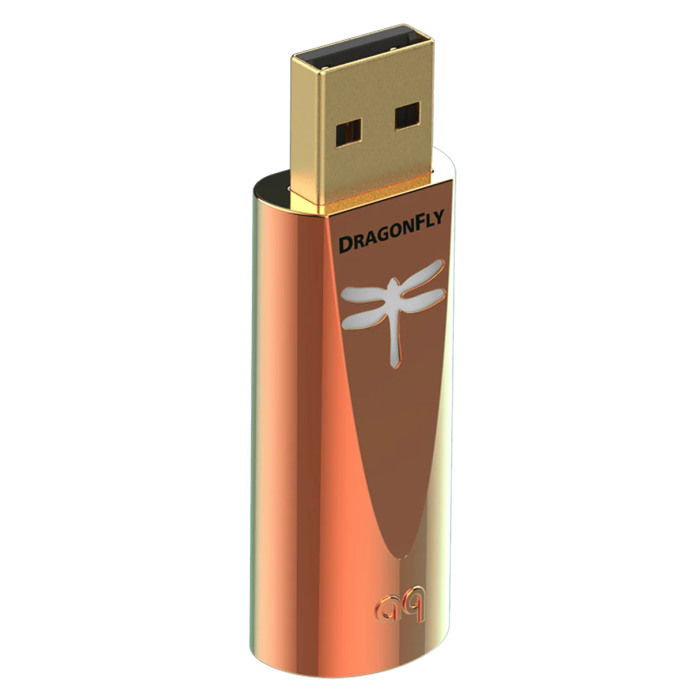
- Australian Stock & Warranty
- Authorised Reseller
- Free Shipping
Found a lower price?
Please complete the form below.
Price found at another internet retailer or their store:
This form is protected by reCAPTCHA - the Google Privacy Policy and Terms of Service apply.
This is a request only. We have the right to refuse any request at our discretion. We only accept requests from stores that have brand new stock and are authorized dealers. We do not accept requests from auction sites and marketplaces.
Audioquest Dragonfly Copper
AUDIOQUEST

Description / Audioquest Dragonfly Copper
AudioQuest DragonFly Copper, the latest and most sophisticated member of the award-winning DragonFly franchise, is a portable USB DAC (digital-to-analog converter), preamplifier, and headphone amplifier that bypasses the audio circuitry in laptops, computers, and smartphones to deliver cleaner, clearer, more naturally beautiful music to headphones, powered speakers, or complete audio systems. Featuring a highly efficient 32-bit ESS Sabre DAC chip, a copper-plated RF-draining case, and twice the output power of any previous DragonFly, Copper delivers class-leading performance matched by physical and sonic beauty.
Long Live DragonFly
Since its introduction in 2012, the award-winning AudioQuest DragonFly DAC-preamp-headphone amp has received enthusiastic recommendations from the New York Times, Rolling Stone, and Men's Health while earning glowing praise from the world's leading hi-fi publications. With more than 300,000 DragonFlys sold worldwide, AudioQuest's little critter has proven capable of disarming even the most rigid audio skeptic.
DragonFly Today
Like all AudioQuest products, the award-winning DragonFly has benefited from gradual refinements made possible by better parts, better materials, and AudioQuest's own insatiable desire for better sound.
DragonFly Copper maintains everything that made its predecessors such a success:
- Beautiful sound from all audio files: MP3 to Hi-Res
- Compatible with Apple® and Windows® PCs, iOS and Android devices
- Drives Headphones; Feeds Preamps, Amps, and Powered Speakers
- Phone, tablet, or computer controls the output level
- Meets all USB Audio Class (UAC) standards; requires no additional drivers
- Dragonfly emblem changes color to indicate playback status and the sampling rate of the file being played: red (standby), green (44.1kHz), blue (48kHz), yellow (88.2kHz), light blue (96kHz)
Compared to previous DragonFlys, Copper offers:
- 2x greater output power
- 25% lower current draw
- High-conductivity copper-plated case for improved RF-noise drainage
Power, Efficiency, Beauty
AudioQuest's careful selection of a new 32-bit ESS Sabre DAC/headphone amp allowed for the implementation of a slightly smaller processor than the one employed in previous designs. In turn, power consumption was reduced by about 25% while significantly improving overall supply-chain efficiency. AudioQuest was able to do more with less.
DragonFly designer Gordon Rankin then did what he does best: He optimized the new DragonFly parts for ultimate performance, reducing distortion to a level significantly below that of previous models.
Drawing 25% less current and delivering two times as much output power as any previous DragonFly, Copper is the most powerful and efficient DAC AudioQuest has ever produced. Its new copper case, informed and inspired by the RF-draining barrels of AudioQuest's Mythical Creatures interconnects, isn't merely gorgeous, but, like every other aspect of the DAC's design, has been implemented for improved performance.
AudioQuest believes the DragonFly Copper faithfully carries forward the esteemed legacy of the DragonFly family, and hopes it introduces many more listeners to the immersive, emotionally compelling musical experience that hundreds of thousands of DragonFly owners have already enjoyed.
ShareContent
When paired with headphones, powered speakers, or a power amplifier, DragonFly operates in variable output mode. For the best results, start by setting the volume control within the music player application to maximum, then bring the computer's main operating-system volume down to around 25%. From there, use the operating-system volume control to adjust to a comfortable listening level. The reason for this approach lies in how DragonFly handles volume. DragonFly Black uses a 64-step analog volume control, while DragonFly Red, Cobalt, and Copper use a more advanced 64-step, 64-bit, bit-perfect digital volume control. In every case, the host device's system volume is, by proxy, controlling DragonFly's own onboard volume — a design AudioQuest has optimised to preserve maximum resolution and sound quality at any volume setting. DragonFly can also be used as a traditional fixed-output source, much like a CD, DVD, or Blu-ray player, connected to a standard input on a receiver or preamplifier. In this configuration it runs in fixed output mode, where overall level is governed by the master volume of the connected audio/video system. For this setup, both the music player's volume and the computer's operating-system volume should be set to maximum.
The LED on the top of DragonFly changes colour to show its current status and the sample rate of the audio being played, so a quick glance tells you what resolution you're hearing. The colours vary slightly between models. On DragonFly Black and Red: red indicates standby, green is 44.1kHz, blue is 48kHz, amber is 88.2kHz, magenta is 96kHz, and purple indicates MQA. On DragonFly Cobalt: red is standby, green is 44.1kHz, blue is 48kHz, yellow is 88.2kHz, light blue is 96kHz, and purple indicates MQA. On DragonFly Copper: red is standby, green is 44.1kHz, blue is 48kHz, yellow is 88.2kHz, and light blue is 96kHz.
Yes, DragonFly can play these files — but it performs at its best when audio is processed at its native sample rate, and DragonFly's ceiling is 96kHz. To get the full benefit from higher-resolution files, it's important to select a playback sample rate that is mathematically related to the file's native resolution. For example, a 192kHz file should be played back at 96kHz, since 96,000 multiplied by two equals 192,000. Choosing a rate that divides cleanly in this way means the computer avoids performing complex, sonically degrading conversion maths, allowing DragonFly to sound its best. It's worth noting that many modern music playback applications handle these conversions automatically on the listener's behalf.
DragonFly Cobalt is broadly compatible across all major platforms, working with Apple iOS, Windows, Android, and Linux. This wide compatibility means it can be used with everything from a desktop or laptop computer to a compatible smartphone or tablet, making it a flexible option whether at a desk or on the move.
DragonFly has a USB-A connector, but it can be connected to any USB-C device using the included DragonTail USB-A to USB-C adaptor. This means there's no need to purchase a separate adaptor or cable — DragonFly is ready to work with modern USB-C phones, tablets, and computers straight out of the box.
Frequently Asked Questions
Features
- 32-bit ESS Sabre ES9218 Chip
- copper-plated RF-draining case
- Compatible with Apple® and Windows® PCs, iOS and Android devices
- Drives Headphones; Feeds Preamps, Amps, and Powered Speakers
- Phone, tablet, or computer controls the output level
- Meets all USB Audio Class (UAC) standards; requires no additional drivers
- Dragonfly emblem changes color to indicate playback status and the sampling rate of the file being played: red (standby), green (44.1kHz), blue (48kHz), yellow (88.2kHz), light blue (96kHz)
Product Inclusions
- Dragonfly Copper
- Dragontail A to C Adaptor
Specifications
| DAC Chip | 32-bit ESS Sabre ES9218 |
| Output | 2.1 volts |
| Mobile Compatibility | Apple iOS; Android |
| Desktop Compatibility | Windows; Apple; Linux (no technical support provided) |
| Volume Control | Phone, tablet, or computer controls the output level |
| Included Accessories | DragonTail A to C Adaptor |
| Country of Origin | Assembled in USA from Imported Parts |